Back That Data Up
Back up everything that matters.
Your Mac, fully backed up, every file, every version, every day. Encrypted, ransomware-aware, and yours forever. Pay once and you're done: no subscriptions, no surprises.
One-time purchase · Requires macOS 26.4 · Windows & Linux are coming soon
Why you'll love it
Backup that does the worrying for you
Powerful enough to rescue your whole Mac. Friendly enough to set once and forget.
Rewind to any day
Made a mess yesterday?
Hop back to any backup and pull out exactly the file you need, or roll the whole Mac back in one move.

Watches for anomalies
BTDU spots the signs of an attack, such as ransomware, and pauses before it can overwrite your good snapshots.
Encrypted for the next 20 years
End-to-end encryption with Touch ID or a hardware key, and cloud keys built on the new post-quantum standard.
The keys live on your Mac, not ours, not anyone's.
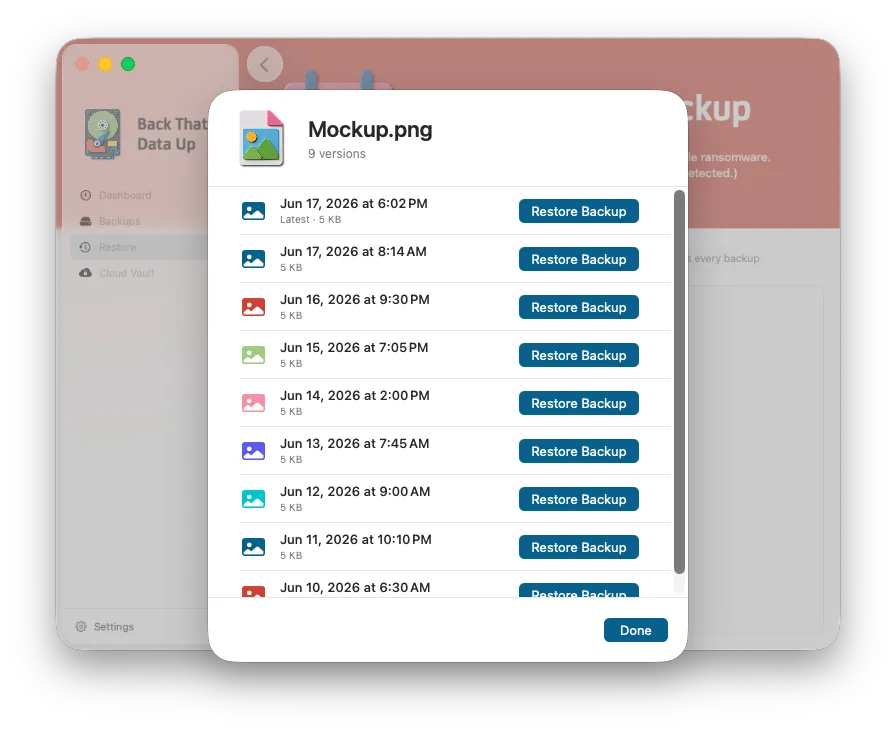
Restore in a click
Search every backup at once, scroll a file's full history, and drop the right version back in place. Done.
It's not if, it's when
The bad day comes for everyone.
Drives fail, laptops walk off, files get deleted, and ransomware doesn't knock. Back That Data Up turns each one from a catastrophe into a shrug.
Drives die.
We keep your files alive.
Every hard drive and SSD has an expiration date, the only question is when.
Roll your whole Mac back to any day, like it never happened.
Laptops vanish.
We rebuild you from scratch.
Gone from a café in five seconds flat. You can replace the hardware, not the files on it.
A new Mac plus your recovery key rebuilds your whole encrypted vault from the cloud.
Files get hijacked.
We keep your files clean.
Ransomware quietly scrambles your files, and most backups copy the damaged versions right over your good ones.
BTDU spots the attack mid-backup and pauses before it can.
You delete it by mistake.
We keep every version.
A careless drag, a wrong save, an emptied Trash, and the file's just gone.
Open its full version history and put the right one back, good as ever.
See it in action
The app does the worrying. You do you.
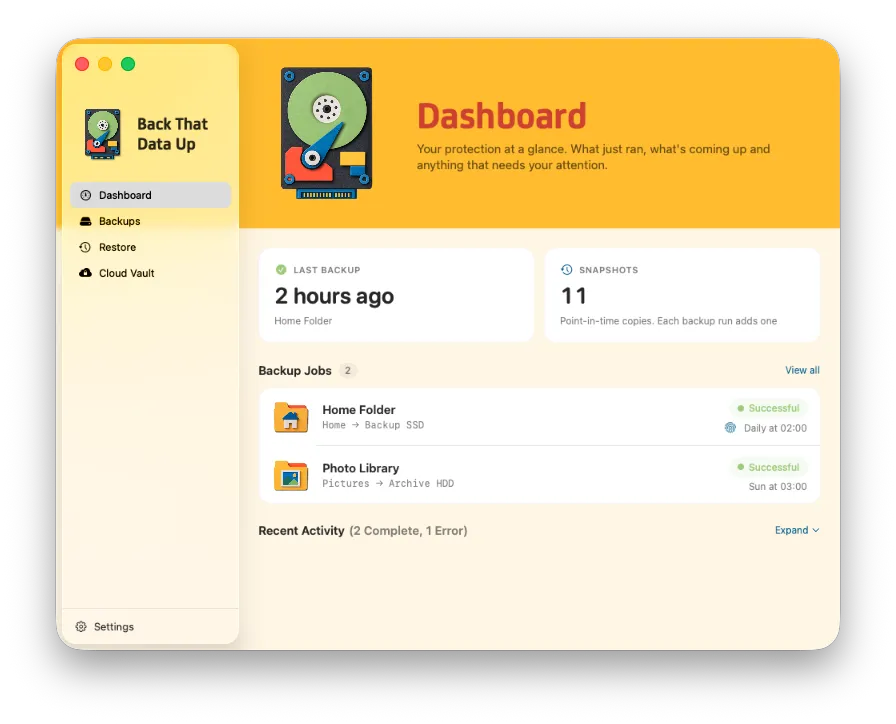
A calm, friendly app that shows what just ran, what's coming up, and anything that needs you. No manuals required.
Snapshots & rewind
Go back to any day, like it never happened.
Every backup starts by freezing your files in a snapshot, so it captures one exact moment instead of a moving target. Keep working while it runs; a file you save halfway through can't end up half old and half new. Open any day and it browses like a living Finder, not a pile of archives, and unchanged files are linked instead of recopied, so each backup stays fast and lean but still complete.
- One frozen moment, never a half-saved file
- Browse any day like it's live
- Restore one file or everything
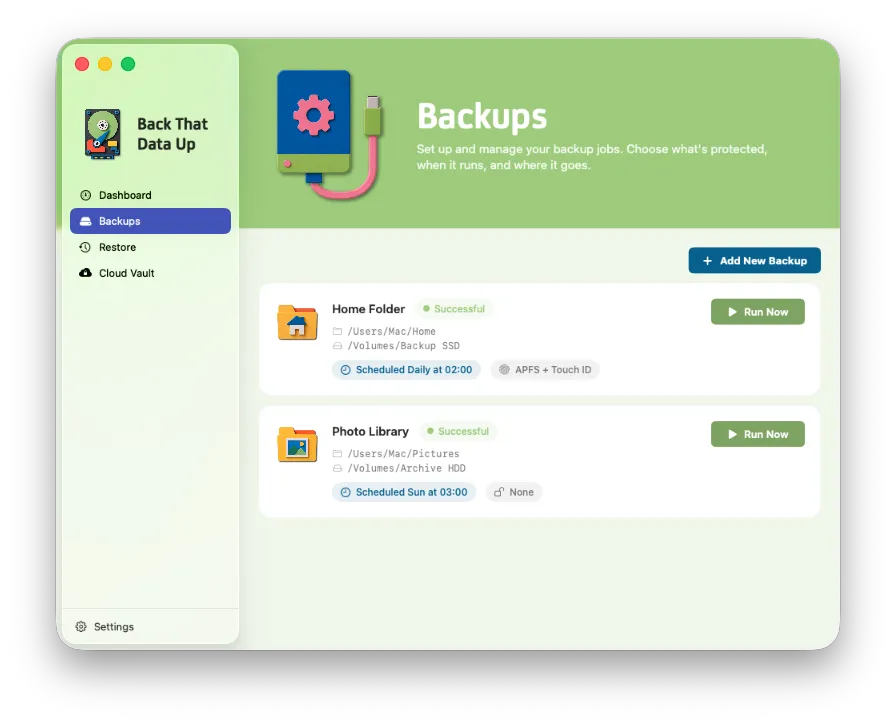
Backups your way
Back up the whole Mac, or just what matters.
Set up as many backup jobs as you like and point each one where it matters — your whole Mac to a roomy external, a single project folder to a fast SSD. Give every job its own schedule, leave out the noise, and let them all run side by side.
- Whole drive or a single folder
- Multiple jobs, each on its own schedule
- Exclude the files you don't need
Restore & history
Find the right version. Put it back. Done.
Search across every backup at once, open any file's complete history, and drop the exact version you need right back where it lives — without clobbering the copy that's already there. No archive spelunking, no guesswork.
- Search every backup at once
- Scrub a file's full timeline
- Restore in place, safely
Cloud Vault, included
The files you can't lose, safe in any cloud, or your own network.
Tax records, the wedding photos, that one folder you'd cry over. Cloud Vault encrypts them on your Mac and tucks them into the cloud you already pay for, or a folder on your own NAS, in a format only you can open. Point it at a whole folder, and new files protect themselves.
 Dropbox
  Google Drive
  iCloud Drive
  OneDrive
  Your network
 Easy by default, powerful when you need it
Set it once. Or fine-tune every last knob.
Most people never leave the defaults — protected in a couple of clicks. Power users can shape every backup right down to the file.
Whole drive, or just a folder
Back up everything, or aim a job at a single folder. Run as many separate backups as you like, side by side.
Exclude what you don't need
Skip individual files, whole folders, or entire file types. Leave out caches, downloads, and that 80 GB scratch disk.
Schedules that fit your day
Run hourly, nightly, or on your own clock with a different schedule for every backup job.
Cloud Vault, the moment you save
Point Cloud Vault at a folder and new or edited files protect themselves the instant they change, no waiting for the next run.
Locked with a hardware key
Seal your vault behind a FIDO security key or Touch ID. No password to phish, and nothing for us to hold.
Simple until you want more
Sensible defaults get you protected in a click. Every knob is right there the day you're ready for it.
Private by design
We can't read your files. That's the whole point.
Back That Data Up runs entirely on your Mac. No account to back up your local drives, no servers holding your data, no telemetry, no peeking. Your files never come to us, so we couldn't share, sell, or lose them if we tried.
How we keep your data private →From the maker
Why I built Back That Data Up
I built this because I wanted a Mac backup app that just always runs for the people in my life who will never open settings, and still lets me tweak every knob when I want to. Same app, two kinds of people.
I am an old school developer. You buy it once and own it, so there is no subscription, ever. It runs on your Mac, your keys never leave it, and there is no account and no telemetry. And because I am the productively paranoid type, you can lock your backup to a FIDO security key, the only Mac backup app that does.
Real customer stories will live here as they come in. Until then, every screenshot above is the actual app.
One price. Pay it once.
$29.99 Personal · $49.99 Family · $9.99 cloud-only.
No subscription, ever. Your wallet can relax.
Student & nonprofit discounts available.
See full pricing →Questions? Answers.
The stuff people ask before buying.
Isn't Time Machine enough?
Time Machine is a great start, but it only keeps a copy on a drive sitting next to your Mac — no offsite copy, and no awareness of ransomware. Back That Data Up adds an encrypted cloud layer and watches for attacks mid-backup.
See the full comparison →Is there really no subscription?
Really. You pay once and the app is yours, updates included. No monthly bill, no annual renewal, no “premium” tier waiting to upsell you. We are old-school software developers who aren't looking for
See pricing →Which Macs can run it?
Back That Data Up runs on Apple Silicon Macs on macOS 26.4 or later. Windows and Linux are coming soon.
Download & requirements →What if I lose my encryption key?
We can't recover it — and that's the point. Your keys live in your Mac's Secure Enclave or on your hardware security key, never with us. Keep your recovery key somewhere safe.
How our encryption works →How many Macs does one license cover?
A Personal license covers your own Macs; a Family license covers up to five. Bought the cloud-only version first? Upgrade to the full app later for just the difference — you never pay twice.
Compare licenses → Stop hoping your files are safe.
Know they are. From $29.99, one time. No subscription.
Download for Mac